Selfy: A Stylish Script Font for Makers
There’s something about the way Selfy flows across a candle label that just feels right. I was working on a batch of handmade soy candles, and as I reached for my font library, I knew I needed something that felt personal, elegant, and a little whimsical. That’s when I pulled up Selfy—a script font that adds a soft, handcrafted touch to any project.
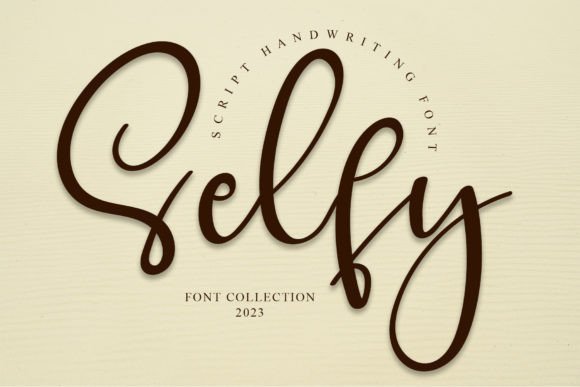
Selfy is more than just a pretty font. It has a distinct personality. The curves are gentle, the strokes are consistent, and the overall feel is warm and inviting. It’s perfect for anything that needs a touch of charm without being too ornate. Whether it's a birthday card, a wedding invitation, or a simple sticker, Selfy brings a sense of thoughtfulness to every design.
Using Selfy in Handmade Projects
One of the first places I used Selfy was on candle labels. I wanted the text to look like it had been handwritten but still maintain a clean and professional look. With Selfy, I could easily type out the scent names and add a little flourish at the end of each label. It gave the product a more personalized feel, which is exactly what I want for my small business.
I also tested Selfy on a set of printable wall art. The font looked great on a rustic farmhouse sign, where it added a touch of elegance without overpowering the design. I paired it with a simple sans serif font for the background text, which helped balance the visual weight and made the whole piece more readable.
Selfy for Branding and Shop Materials
As a handmade seller, consistency is key. I use Selfy across my shop branding, from product listings to social media graphics. It gives my brand a cohesive look that feels authentic and professional. When customers see the same font on my packaging, labels, and digital downloads, it helps reinforce their recognition of my work.
Selfy works well for short phrases and titles, making it ideal for product tags, boutique labels, and seasonal decorations. I’ve used it on holiday gift tags, where the font’s softness complements the festive theme. It also looks great on mugs and tote bags, where it adds a personal touch without being too busy.
Designing with Selfy
When designing with Selfy, I always keep readability in mind. While it’s a script font, it remains legible even at smaller sizes. This makes it perfect for stickers, labels, and product tags where space is limited. I’ve used it on small paper stickers for my candle jars, and it still holds up beautifully.
For larger designs, such as invitations or wall art, Selfy shines even more. Its fluid lines and natural rhythm make it ideal for decorative wording and display purposes. I’ve used it on wedding welcome boards and planner pages, where it adds a subtle yet elegant flair.
Font Pairing and Style Options
Selfy pairs well with other fonts that complement its style. I often pair it with a clean sans serif for contrast, or with a simple serif for a more traditional look. Depending on the project, I might also use it alongside a handwritten font for a more casual, artisanal feel.
The font includes various styles, alternates, and ligatures, which give me flexibility in design. I’ve used different versions of Selfy for different projects, ensuring that each one has a unique yet cohesive look. The file formats are also compatible with most design software, making it easy to integrate into my workflow.
Selfy for Digital Downloads and Printables
As a printable creator, I rely on fonts that are both beautiful and functional. Selfy is perfect for digital templates, whether it's for a wedding invitation, a printable planner page, or a seasonal sign. It adds a personal touch that makes each download feel special.
I also use it for mockup previews and listing images. The font’s clarity and style help showcase the final product in a way that’s appealing to potential buyers. It’s a great tool for creating visually engaging content that stands out in a crowded marketplace.
Considerations for Commercial Use
Before using Selfy for commercial projects, I always check the licensing terms. It’s important to ensure that the font is properly licensed for the intended use, whether it's for physical products, printables, or digital downloads. Selfy offers clear guidelines, which makes it easy to comply with any requirements.
For those who are new to typography, Selfy is a great starting point. It’s versatile enough to work with a variety of design styles while maintaining its own unique character. Whether you're a crafter, a stationery designer, or a small shop owner, Selfy can help elevate your creative work.